
More and more of the companies I talk to want an “AI brain,” and most of them start by picking a tool. That’s the wrong first step. The tool is the easy part. What breaks these projects is the data nobody has organized, the question of who’s allowed to write to the shared brain, and a lot of open-source software that isn’t quite what its website says it is. One of the better-known projects in this space still describes itself as open source and self-hostable on its homepage, while every repository in its GitHub organization is now archived, with the last code change on June 5.
This post covers what an AI brain actually is, the seven problems I see people hit, how to solve each one, and which open-source projects I’d look at today, with every number pulled from GitHub on October 29.
Why this one is here
I run my own AI brain. It holds what I know about five companies, dozens of clients and partners, and my meeting notes, and it’s the first place my AI assistants look before they answer a question about my work. At Omnilogic Labs we also build these for clients, which means I get to watch the same mistakes happen in very different organizations.
That combination is where the opinions in this post come from. Building one for yourself teaches you what makes a brain useful. Building them for other people teaches you what makes them fail.
First, what an “AI brain” actually is
Think about the best executive assistant you’ve ever worked with. They remember who said what in last month’s meeting, they know which version of the contract is current, and when you ask a question, they don’t start from zero. They already know your world.
Tools like ChatGPT and Claude don’t work that way out of the box. Every new conversation starts with a blank slate. You end up re-explaining your company, your clients and your projects over and over, and the AI still gets details wrong because it never saw the source.
An AI brain fixes that. It’s a store of your organization’s knowledge, kept in a form an AI can search and read, connected to the AI tools your people already use. When someone asks “what did we agree with this client about pricing?”, the AI looks it up in the brain and answers from your records instead of guessing.
There are two broad ways to build one:
- The search approach (usually called RAG, short for retrieval-augmented generation). You connect your existing documents, email and drives. The system indexes them, and when someone asks a question, it finds the most relevant passages and hands them to the AI. Fast to set up, and it works with whatever you already have.
- The curated approach. The AI reads your raw material and writes and maintains a set of organized pages about it: one per client, one per project, one per decision. Andrej Karpathy described this pattern in April as an “LLM Wiki”, and his key line is that the wiki becomes “a persistent, compounding artifact.” Every new meeting or document improves pages that already exist, instead of becoming one more file to search.
My own brain uses the curated approach. Raw material (transcripts, email threads, notes) goes into an inbox folder the AI never edits. The AI turns it into linked pages in a separate folder. A master index and a running log track what changed, and a weekly health check looks for contradictions and pages that have gone stale. Most company brains I see use the search approach. The best ones end up combining both.
The 7 problems everyone hits, and how to solve each one
1. Starting with the tool instead of the questions
The most common opening move is “should we use Notion, Obsidian or SharePoint?” Those are places where content lives. They aren’t the brain. A brain is the layer that makes that content findable and trustworthy to an AI, and it should plug into wherever your content already is.
The fix: write down the twenty questions your people ask most often and can’t answer quickly today. “What’s the status of this client?” “Where’s the latest version of the onboarding manual?” “Has anyone already researched this competitor?” Those questions tell you which sources to connect first, and they become your test set later.
2. Thinking the technology is the hard part
It isn’t. Loading the data is the hard part. Most organizations have their knowledge spread across five drives, three inboxes, a chat tool and the heads of two long-tenured employees. Much of it is duplicated, and some of it is wrong.
The fix: start with one department or one workflow, and load it properly. A small brain that answers correctly earns trust. A big brain that answers confidently from a 2021 draft destroys it, and people rarely come back after the first wrong answer.
3. Letting everyone write to the shared brain
This one is subtle and it’s the most expensive to undo. If everyone can add to the company brain, it fills up with half-finished notes, personal opinions and contradictory versions of the same process. Once bad information is mixed into a shared knowledge base, it’s very hard to find and remove.
The fix: two layers. Every person gets a personal brain they can write to freely. The shared company brain is read-only for most people, and one owner decides what gets promoted into it. A team I work with set it up exactly this way and agreed on a simple rule: start slowly with what goes into the shared brain, and decide the governance before anyone gets write access. It feels bureaucratic for about two weeks and then it feels obvious.
4. No rule for what stays private
Brains collect everything, including salaries, health information, legal disputes and things said in confidence. If the AI can read it, the AI can repeat it to the wrong person.
The fix: decide up front which kinds of information are never stored, and enforce it with rules at ingestion rather than hoping people remember. Use access controls that mirror your existing permissions, so a brain connected to your drive shows each person only what they could already open.
5. Duplicated work inside the brain
Once people discover they can teach the AI new tricks (saved prompts, skills, reusable workflows), they all build their own versions of the same thing. It’s common to find several people independently building the same research workflow.
The fix: treat reusable skills like any other company asset: a simple approval and release step, one owner, and a short walkthrough when something new ships. Centralize research in particular. If someone has already analyzed a competitor, that analysis should be the first thing the brain finds.
6. Expecting people to just start using it
Announcing a brain in a team chat doesn’t produce adoption. People keep doing what they did before, because the old way is a habit and the brain is a new tab.
The fix: live walkthroughs, short explainer videos, and one or two champions per team who show real examples from their own work. Load something people need every week (the manual for a new platform, for example) so the brain becomes the fastest way to get an answer.
7. Never checking whether it’s still right
Knowledge goes stale. Clients change, prices change, people leave. A brain that was accurate in March can be quietly wrong by September.
The fix: a scheduled health check. Mine runs weekly and looks for contradictions between pages, claims that haven’t been updated in a long time, and pages nothing links to. Then keep a fixed set of test questions (the twenty from problem 1) and re-ask them every month. If an answer gets worse, you’ll know before your people do.
The open-source projects worth knowing
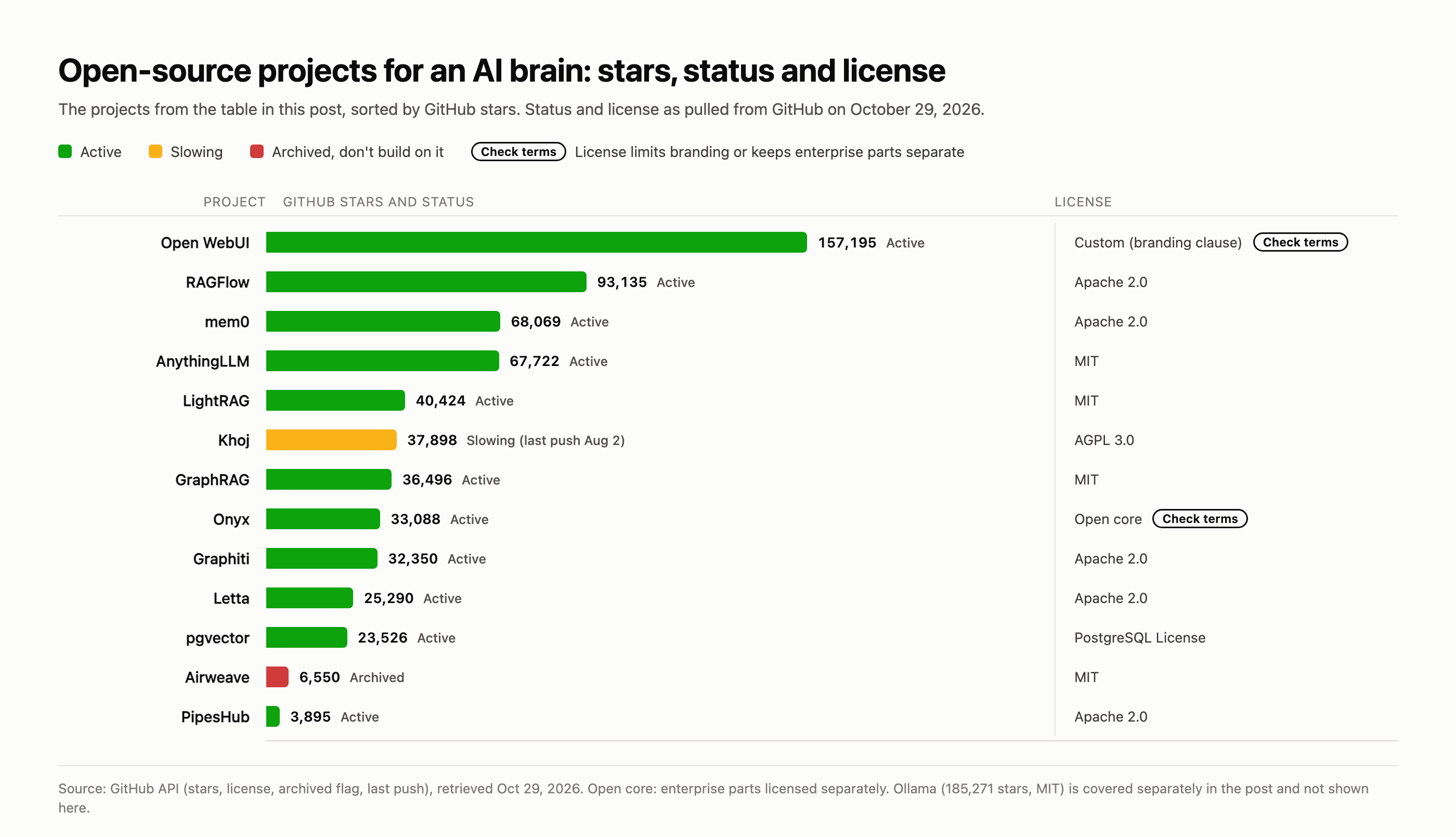
You don’t need to build any of this from scratch. These are the projects I’d look at, grouped by the job they do. Star counts and status were pulled from the GitHub API on October 29, 2026.
| Project | What it’s for | GitHub stars | License | Status |
|---|---|---|---|---|
| Open WebUI | Chat front end for your own models and documents | 157,195 | Custom (branding clause) | Active |
| RAGFlow | Document-heavy search and answers, strong on PDFs | 93,135 | Apache 2.0 | Active |
| mem0 | Long-term memory for AI agents | 68,069 | Apache 2.0 | Active |
| AnythingLLM | All-in-one private brain, desktop or server | 67,722 | MIT | Active |
| LightRAG | Fast search engine that also maps relationships | 40,424 | MIT | Active |
| Khoj | Personal “second brain” assistant | 37,898 | AGPL 3.0 | Slowing (last push Aug 2) |
| GraphRAG | Microsoft’s knowledge-graph search | 36,496 | MIT | Active |
| Onyx | Company-wide search with built-in connectors | 33,088 | Open core (enterprise parts licensed separately) | Active |
| Graphiti | Knowledge graphs that track how facts change over time | 32,350 | Apache 2.0 | Active |
| Letta | Agents with memory that learn across sessions | 25,290 | Apache 2.0 | Active |
| pgvector | Adds AI search to an ordinary Postgres database | 23,526 | PostgreSQL License | Active |
| PipesHub | Company knowledge layer with connectors | 3,895 | Apache 2.0 | Active |
| Airweave | Retrieval layer for agents | 6,550 | MIT | Archived |
Three other tools come up in almost every conversation about this, and they deserve a note:
- Obsidian is where my own brain lives. It’s free, and because every page is a plain text file on your own disk, any AI can read it. It isn’t open source, though, and it’s a place to keep notes, not a search engine. Treat it as a source, not the brain.
- Ollama (185,271 stars, MIT) runs AI models on your own hardware. It’s the piece that makes a fully private brain possible.
- Model Context Protocol is the standard most AI assistants now use to connect to outside tools. If a brain supports it, you can usually use it from Claude, ChatGPT or Copilot without rebuilding anything.
Which one should you use?
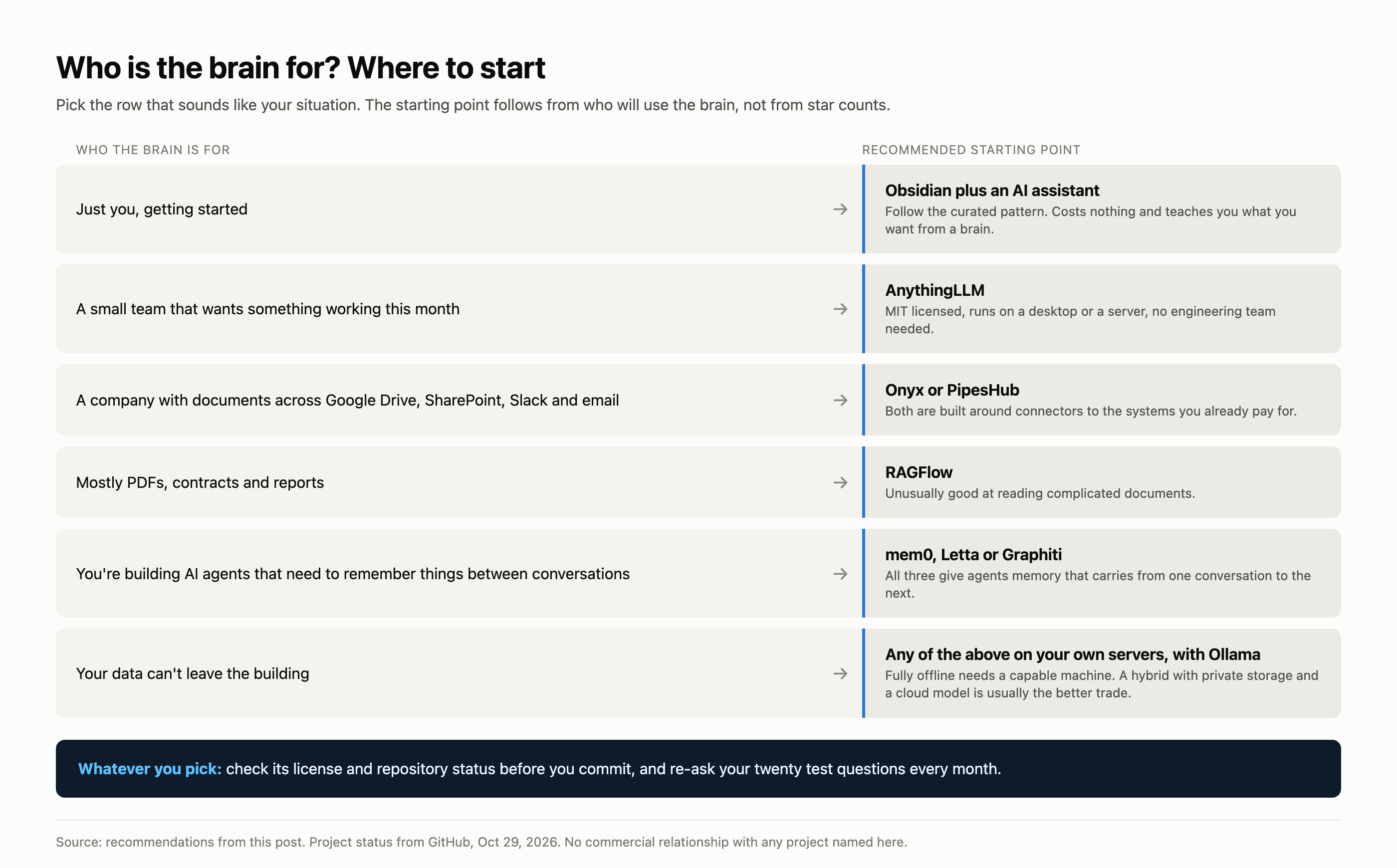
- Just you, getting started: Obsidian plus an AI assistant that can read the folder, following the curated pattern above. It costs nothing and teaches you what you actually want from a brain.
- A small team that wants something working this month: AnythingLLM. It’s MIT licensed, runs on a desktop or a server, and doesn’t require an engineering team.
- A company with documents spread across Google Drive, SharePoint, Slack and email: Onyx or PipesHub, both built around connectors to the systems you already pay for.
- Mostly PDFs, contracts and reports: RAGFlow, which is unusually good at reading complicated documents.
- You’re building AI agents that need to remember things between conversations: mem0, Letta or Graphiti.
- Your data can’t leave the building: any of the above on your own servers, with models running through Ollama. A fully offline setup needs a capable machine, which tends to price it out for very small businesses; a hybrid with private storage and a cloud model is usually the better trade.
What I’d avoid
Projects whose repository is archived, whatever the website says. Airweave’s homepage still says it’s open source and can be self-hosted. Its GitHub repository, and every other repository in the organization, is archived, and the last code change was on June 5. The hosted product may be fine. But if your plan was to run the open-source version yourself, you’d be building on code that no longer receives fixes, including security fixes. Always check the repository, not the marketing page.
Rebranding software whose license forbids it. This one catches consultants and agencies who want to offer a brain under their own name. Open WebUI’s license prohibits removing or replacing its branding once a deployment passes 50 users in a rolling 30-day period, unless you have written permission or an enterprise license. Dify, another very popular platform, uses a modified Apache license that bars removing its logo from the front end and bars running it as a multi-tenant service without a commercial license. Both are fine products. Read the license before you promise a client their own logo.
Treating a note-taking app as the brain. Notion, Obsidian and SharePoint hold content. Without a retrieval layer on top, your AI is just one more person searching folders.
A single shared brain with open write access. See problem 3. It’s the mistake that costs the most to undo.
What I’d tell a client
Pick one team and its twenty most-asked questions. Connect only the sources that answer them. Give everyone a personal space and keep the shared brain locked until someone owns it. Choose a tool from the list above that matches who the brain is for, check its license and repository status before you commit, and re-ask those twenty questions every month.
None of that is technically difficult. It’s organizational, which is exactly why most attempts skip it, and why most attempts end up with an expensive search box nobody trusts.
Next in this series: Cursor, VS Code with Copilot, or Claude Code, and how to choose what your team builds with. Previously: which industries are actually being transformed by AI.
Sources
- Andrej Karpathy, “LLM Wiki”, April 4, 2026
- GitHub repository data (stars, license, archived flag, last push) retrieved from the GitHub API on October 29, 2026, for every project in the table
- Open WebUI license, clause 4
- Dify license
- Onyx license
- Airweave homepage and GitHub organization
- Model Context Protocol
How this post was made: I use an AI pipeline to research and draft, and every fact, number and link was checked against its primary source before publishing. I have no commercial relationship with any project named here.
— Juan


Leave a Reply