OpenAI removes the Sora 2 API on 24 September 2026. If you have a script, an automation, or a product feature calling it, that call stops returning video on that date. OpenAI has not named a replacement model. Most of the “best AI video tools” articles currently ranking on Google still recommend Sora near the top.
That’s the urgent part, and it’s below in detail. The rest of this post is what I’d actually use instead, and what this category can and cannot do right now.
Why this one is here
Most of what I write on this blog is about strategy. Every so often it’s worth going down to the tool level, because that’s where the strategy either works or quietly falls apart.
Building AI systems is my day job. At Omnilogic Labs we design and run AI automation for banks and enterprises, and we do that work for clients continuously rather than as one-off projects. That’s the part that makes a post like this possible. When you’re accountable for systems that other people depend on, you stop caring which model won a benchmark last month and start caring about which one will still exist next year. Those turn out to be very different questions.
This month gave a painful example of exactly that.
First, what AI video generation actually is
You type a sentence. A model gives you back a few seconds of video that never existed.
That’s the whole idea. Underneath, these systems have been trained on enormous quantities of footage and have learned what things look like when they move: how fabric falls, how a face turns, how light behaves on water. When you describe a scene, the model produces frames that are statistically consistent with everything it has seen.
Two things follow from that, and they explain most of what’s in this post.
The first is that these models are guessing, extremely well, about appearance. They aren’t simulating the world. Nothing inside them knows that a glass which tips over should spill. That’s why the failures look strange rather than merely low quality.
The second is that the good ones are expensive to train and run, which means they are products, owned by companies, subject to business decisions. A model you build a workflow around is not a permanent fixture. It’s a vendor relationship.
Which brings us to the news.
The part that’s urgent: the Sora API is being removed
If you read almost any “best AI video tools” article written this year, Sora is near the top. That advice is now actively harmful.
OpenAI announced on 24 March 2026 that the Sora 2 model and the Videos API would be removed. The removal date is 24 September 2026. The consumer Sora app was already discontinued back on 26 April.
The detail worth pausing on is what OpenAI listed as the recommended replacement: nothing. The deprecation table has an empty cell where a migration target would normally go. There is no other OpenAI video model to move to. The company that arguably started the current wave of excitement about AI video has left the category.
If you have anything automated that calls that API, it stops returning results. Not degraded output, no fallback, just an end. This is the most concrete illustration I can offer of a point I make to clients constantly: the model is not your system. Your system is what happens when the model goes away.
If you are still on the Sora API
Three things, in order.
Find every call site today. In my experience this is where the unpleasant surprise lives. It’s rarely just the one feature somebody remembers building. Search your codebase for the endpoint, then check scheduled jobs, internal tools, and anything a non-engineer wired together with a no-code platform. Those last ones are invisible to code search and they will be the ones that break loudly.
Decide what “failure” should look like before the date, not after. If a video does not generate on 25 September, what does your system do? Retry forever against a dead endpoint? Publish without the video? Alert somebody? An unhandled shutdown turns into silent failure, and silent failure is the expensive kind.
Then pick a replacement, and put an adapter in front of it. Veo 3.1 is the closest equivalent for cinematic output with sound, and it ships through Google Cloud, which matters if you need contracts and provenance. Runway Gen-4.5 is the better choice if your team needs shot-level control. Whichever you choose, do not call it directly from twelve places in your codebase. Wrap it once. The next deprecation is already scheduled, somewhere, by someone.
What actually works right now
With that said, the category itself is in far better shape than it was when most of the guides now circulating were written.
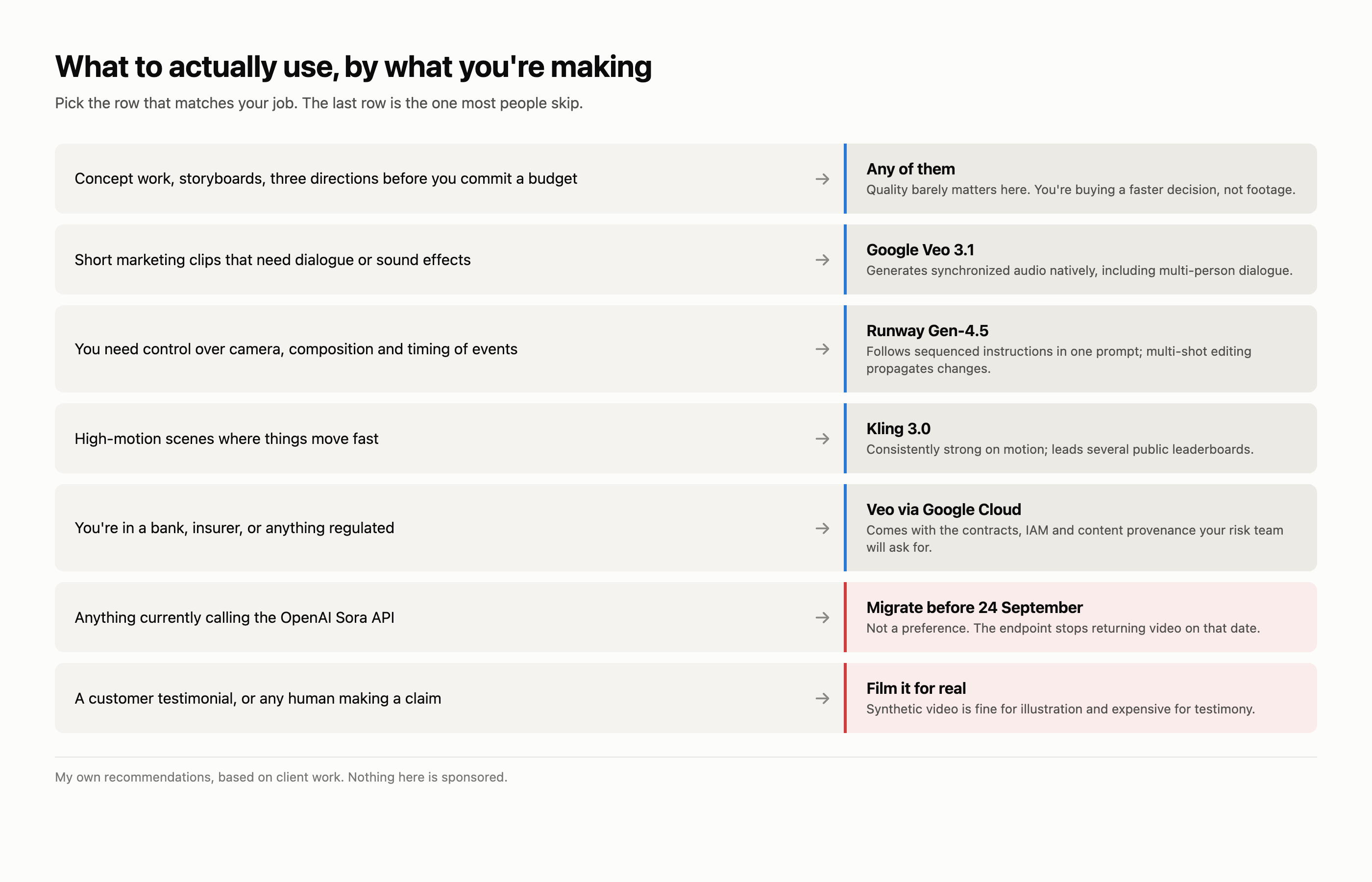
Short clips with sound, generated together. This is the genuine advance of the last year. Google’s Veo 3.1 generates synchronized audio natively, including multi-person dialogue and timed sound effects, rather than producing silent footage you score afterward. Runway’s Gen-4.5 added native audio generation and audio editing of existing video. Sound used to be the obvious tell. It isn’t anymore.
Concept work and pre-visualization. This remains the highest-value use I see. Showing a client three visual directions before anyone books a crew is worth real money, and it doesn’t matter that the output isn’t broadcast quality, because nobody is broadcasting it. It’s a thinking tool.
Controlled, deliberate shots. Gen-4.5 will follow sequenced instructions in a single prompt: camera movement, composition, the timing of events. Its multi-shot editing propagates a change made in one scene through the rest of the video. That’s the difference between a slot machine and a tool.
Anything short. Veo 3.1 generates in 4, 6, or 8 second clips, extending to a minute or more by chaining. Gen-4.5 runs 2 to 10 seconds. Notice that every one of these numbers is measured in seconds. That is not an accident, and it’s the honest boundary of the technology today.
What still doesn’t work
Length. Everything above is built out of short generations stitched together. There is no model that will hand you a coherent five-minute scene. The joins are where quality goes to die.
Consistency of a specific person or product across shots. The tools have improved at this and it is still the thing that breaks commercial work most often. Your product needs to be the same product in shot four as in shot one.
Physics. Because these models learned appearance rather than mechanics, anything involving contact, weight, or fluid tends to look subtly wrong in a way viewers notice without being able to name.
Anything a viewer must trust. This is the limitation I’d underline for business readers. Synthetic video is fine for illustration and poor for testimony. The moment a viewer suspects a person on screen isn’t real, you’ve spent credibility you can’t easily earn back. Use it for the abstract, not for the human claim.
The current set, honestly described
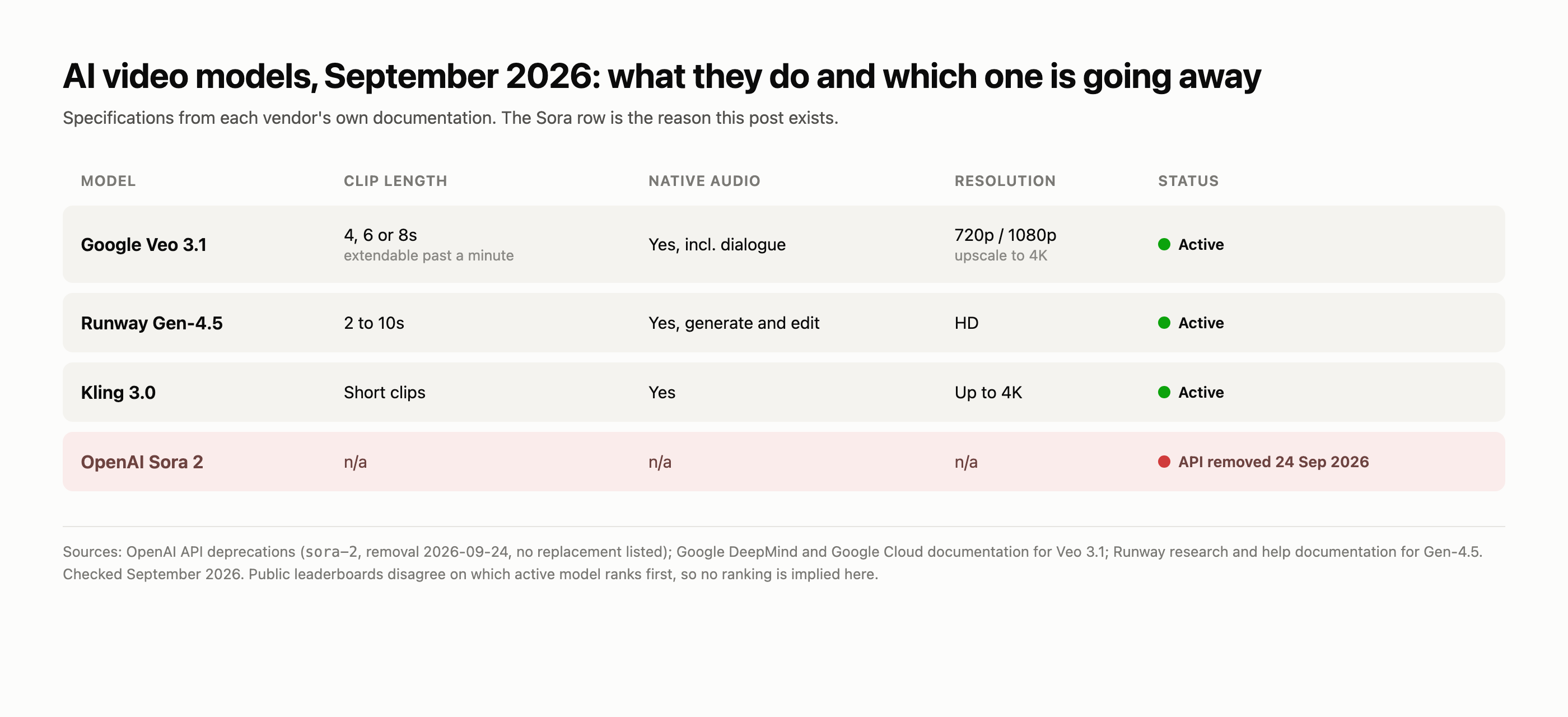
| Model | Clip length | Audio | Notes |
|---|---|---|---|
| Google Veo 3.1 | 4, 6, or 8s, extendable past a minute | Native, incl. dialogue | 720p/1080p, upscaling to 4K. Three tiers, Lite is the cheap one. Ships through Google Cloud. |
| Runway Gen-4.5 | 2 to 10s | Native generation and editing | Strongest control surface. Multi-shot editing. In the API since 10 February 2026. |
| Kling 3.0 | Short clips | Yes | Strong on high-motion scenes. Leads several public leaderboards. |
| OpenAI Sora 2 | n/a | n/a | Removed 24 September 2026. No replacement. |
One caveat on rankings, because it matters and most articles hide it. Different leaderboards currently disagree about which model is best. Runway reports Gen-4.5 at the top of the Artificial Analysis text-to-video benchmark; other public arenas put Kling ahead. Both can be true, because they measure different things with different voters. Treat any article that declares a single winner with suspicion, including this one. Test on your own material.
Where this earns money, and where it burns it
The question I actually get asked is not which model is best. It’s whether any of this is worth the trouble yet. For most businesses the honest answer is “for some things, clearly yes, and you should be careful about the rest.”
It earns its keep in pre-production. Storyboards, mood pieces, three visual directions for a campaign before anyone commits a budget. The output does not need to be broadcast quality because it is never going to air. It exists to make a decision faster. This is the use case I would start with in almost any company.
It earns its keep in volume where the stakes are low. Product B-roll, background footage, social filler, internal training segments that currently do not get made at all because commissioning them is not worth it. The comparison here is not “AI video versus a film crew,” it is “AI video versus nothing,” and nothing is what most companies currently produce.
It burns money on anything that carries a claim. Customer testimonials, executive messages, anything where a viewer needs to believe a specific human said a specific thing. Not because the technology cannot do it, but because the downside when someone notices is much larger than the production cost you saved.
It burns time when teams expect finished output. The single most common failure I see is a team generating clips, finding them 80 percent right, and having no plan for the remaining 20 percent. Generated footage is raw material. If nobody on the project owns the edit, the project stalls at “impressive demo.”
What I’d actually tell a client
Don’t build on a single model. This is the Sora lesson and it cost some teams real money. Put a layer of your own between your workflow and whichever model you’re calling, so that swapping providers is a configuration change rather than a rewrite. We do this by default now.
Budget for the edit. Generated footage is raw material. Teams that plan for post-production get usable results; teams that expect finished output get frustrated and conclude the technology doesn’t work.
Pick by constraint, not by benchmark. If you’re in a regulated industry, the model that ships through your existing cloud vendor with proper agreements and content provenance is worth more than a slightly better-looking competitor. Veo running through Google Cloud is a different procurement conversation than a startup’s API.
Decide your disclosure policy before you need one. Not because regulation demands it yet in most places, but because getting caught having not decided is worse than any policy you’d have chosen.
The lesson underneath
I’ve written before that the hardest part of production AI isn’t the model, it’s everything around the model. Sora’s shutdown is that argument made concrete, on a specific date, with no appeal.
The teams that will shrug this week are the ones who treated the video model as a replaceable component. The teams having a bad week are the ones who treated it as a foundation. Nothing about the quality of the model distinguished those two groups. Only the architecture around it did.
That’s the whole job, really.
Sources
- OpenAI API deprecations,
sora-2removal dated 2026-09-24: developers.openai.com/api/docs/deprecations - What to know about the Sora discontinuation: help.openai.com
- Veo 3.1, Google DeepMind: deepmind.google/models/veo
- Veo 3.1 in the Gemini API, Google Developers Blog: developers.googleblog.com
- Veo 3.1 Lite and upscaling on Vertex AI, Google Cloud: cloud.google.com
- Introducing Runway Gen-4.5: runwayml.com/research/introducing-runway-gen-4.5
- Creating with Gen-4.5, Runway help: help.runwayml.com
- Runway API changelog: docs.dev.runwayml.com
Specifications change frequently in this category. Everything above was checked in September 2026. Check it again before you commit to anything.
A note on how this gets made: I run my own content pipeline, the same kind of system I build for clients. It drafts, I edit and fact-check every line, and I sign it. Claiming expertise in production AI and then hiding that I use it would be a strange way to make the point.
— Juan

